The Robot You Had to Show
The Unimation PUMA's teach pendant had a FREE mode that let go of the robot's motors entirely. You grabbed the arm, pushed it where you wanted it, and pressed RECORD. Your body wrote the code.
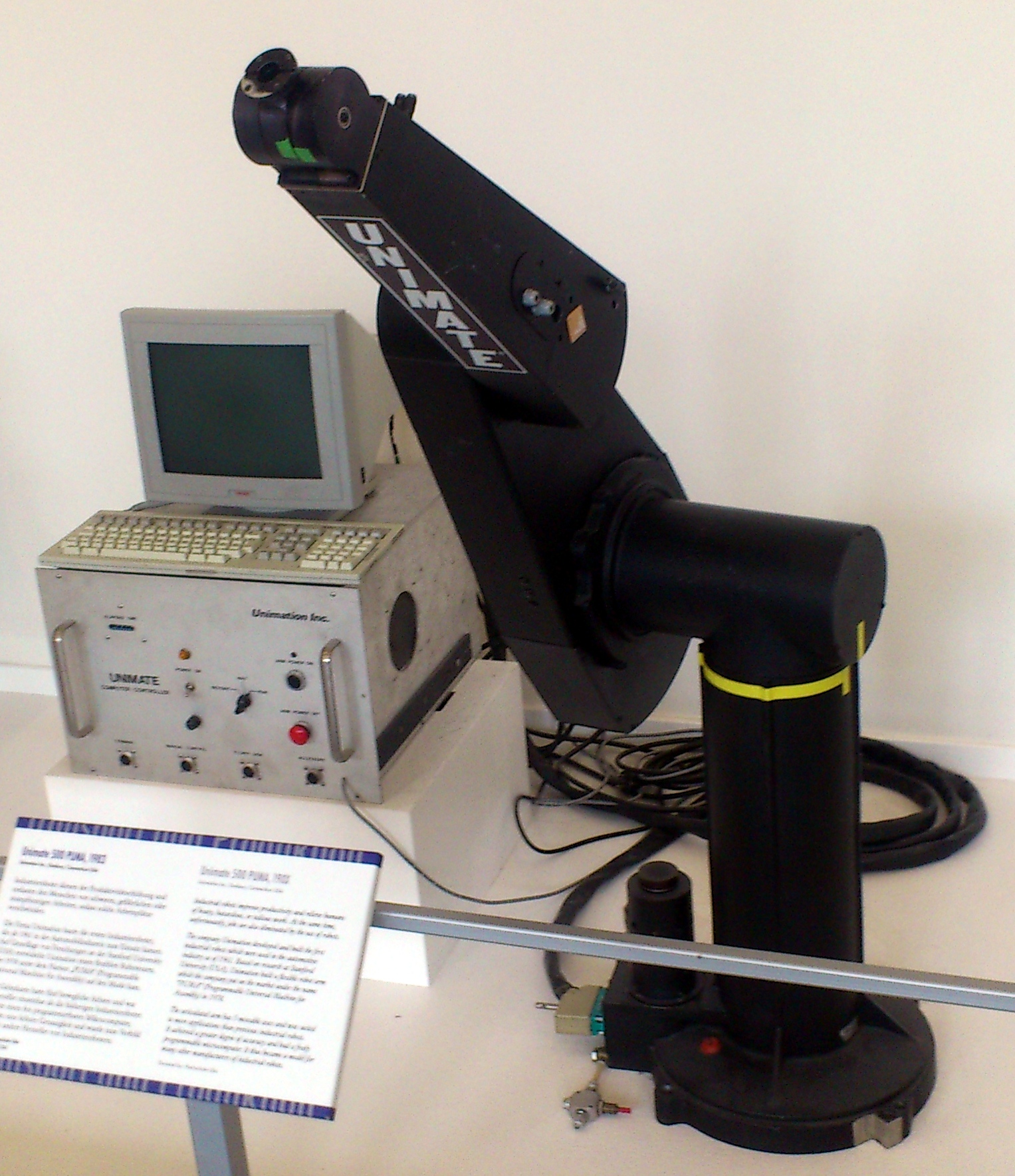
Every industrial robot in the museum's era was programmed by some kind of code. The Heidenhain TNC 110 asked the machinist questions and the machinist answered with function keys. The Rockwell AIM-65 needed hex bytes toggled in. The Topo ran TopoBASIC from an Apple II. All of them assumed that the human would translate intention into symbols before the machine could act.
The Unimation PUMA came with a different philosophy. It had a teach pendant — a heavy handheld box tethered to the controller by a thick cable, carrying six mode buttons, a speed knob, joint-select toggles, and a RECORD key. You could use it to jog the arm incrementally, joint by joint, watching the position readout. That was the conventional way, and it worked.
But the pendant also had a mode called FREE. When you pressed FREE, the servos released their grip on the arm. The powerful electric motors that normally held the robot in place went completely limp. The arm became a passive skeleton, heavy and counterbalanced, but free to move with your hands. The VAL User's Guide (June 1980, version 12) describes it in a single sentence: "The servo system releases control of that joint, and you can move it to a new position by pushing on the members of the robot."
You grabbed the robot and moved it. Then you pressed RECORD, and the controller logged the position as a program point — NEW1, NEW2, NEW3 — and generated a MOVET or MOVEST instruction in VAL, the first widely-used robot programming language. You did not type coordinates. You did not write a line of code. You showed the machine what you wanted, with your own arms, in the same physical space the robot would occupy when it executed the program.
The safety logic
The pendant's anatomy tells you everything about the relationship it assumed between human and machine. The OFF button was the panic halt, oversized and within thumb reach. The joint toggles had to be held — release them and the motion stopped. Later PUMA generations added a three-position enabling switch that the operator had to keep depressed; let go or squeeze too hard, and the system faulted. This hold-to-operate logic became the industry dead-man standard, a direct descendant of the PUMA's design.
The philosophy embedded in the pendant is that the robot is never autonomous while a person shares its space. Every programmed move was deliberate. The speed knob had an increment setting (INC, full counterclockwise) that moved the arm in servo-resolution steps — the smallest possible increment — for fine positioning. The mode buttons (JOINT, WORLD, TOOL) changed which coordinate system the toggles addressed: individual joints, world axes, or the tool's own orientation. There was no ambiguity about what the arm would do when you pressed a button, because the arm was visible, right there, reaching into the same air you breathed.
Programming by manipulation
The PUMA was designed by Victor Scheinman out of his Stanford arm for General Motors, and it was built for assembly — the kind of work where a human could show a robot a sequence of pick-and-place operations faster than they could write them down. The teach pendant made the robot a direct extension of the human's body knowledge: the shoulder learned the reach, the wrist learned the angle, and the fingers learned the release. VAL recorded the positions and could replay them for the rest of the shift, for the rest of the week, for the rest of the year.
This is the opposite of the Topo. Topo was a pure output device — code drove a body that had no senses and could not feel where it was. The PUMA's teach pendant was the reverse: a body wrote the code, and the body in question was the programmer's own. The machine learned by being handled.
The PUMA path is still how collaborative robots are taught today. The modern "drag-to-teach" or "kinesthetic teaching" mode in every collaborative robot arm — Universal Robots, Franka Emika, Rethink Robotics' Baxter — is the direct descendant of Unimation's FREE mode and the RECORD button. The difference is that modern arms are lighter, with torque sensors that let them feel your touch. The PUMA dispensed with the sensing: it just let go of the motors and trusted you to push.
The boundary
The teach pendant is one of the strangest interfaces in the museum because it makes the boundary between human and machine not just visible but physical. You did not program the robot from a safe distance. You stood in its workspace, put your hands on its arm, and moved it through the motion you wanted it to repeat. The OFF button was there because the robot was heavy enough to injure you if you made a mistake. The program was written in the machine's own joint coordinates, captured from your gesture — and then the machine took over and did the same thing, every time, without your hands ever touching it again.
That is the whole story. The robot that had to be shown, and then remembered.
— Beepy